XFL - Extended Formula Language
|
|


What's XFL

What's XFL
|
|
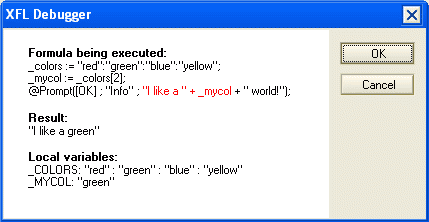
XFL programming has been presented at Notes related conferences as EntwicklerCamp and DNUG. Real formula debuggingDo not slave away at pseudo debugging using @Prompt any longer! Take the XFL @Formula debugger. It can be so easy! You even can use a SmartIcon to activate or deactivate the debugger.
Define your own @FunctionsAdd new @Functions to the formula language or define alias names to existing functions. Example: You also can easily embed functions of your LotusScript libraries and make them usable as new @Functions. A lot of new @Functions are implemented in XFL as well. Use LotusScript code within your formula codeUse @Execute to take advantage from the LotusScript language in your formulas. Object oriented programming in formulasYou can use LotusScript classes and handle objects by formula. Example:
... and much more. Just read the documentation file to find out all the features. |
|
Lotus Notes is a registered trademark of IBM. This site is not affiliated with IBM or Lotus. |